Organize your tasks. Stay on track.
Manage tasks, due dates, priorities and recurring tasks online with eclipso Task Manager. Keep personal and professional tasks in view and synchronize them with CalDAV.
Everything you need for productive task management
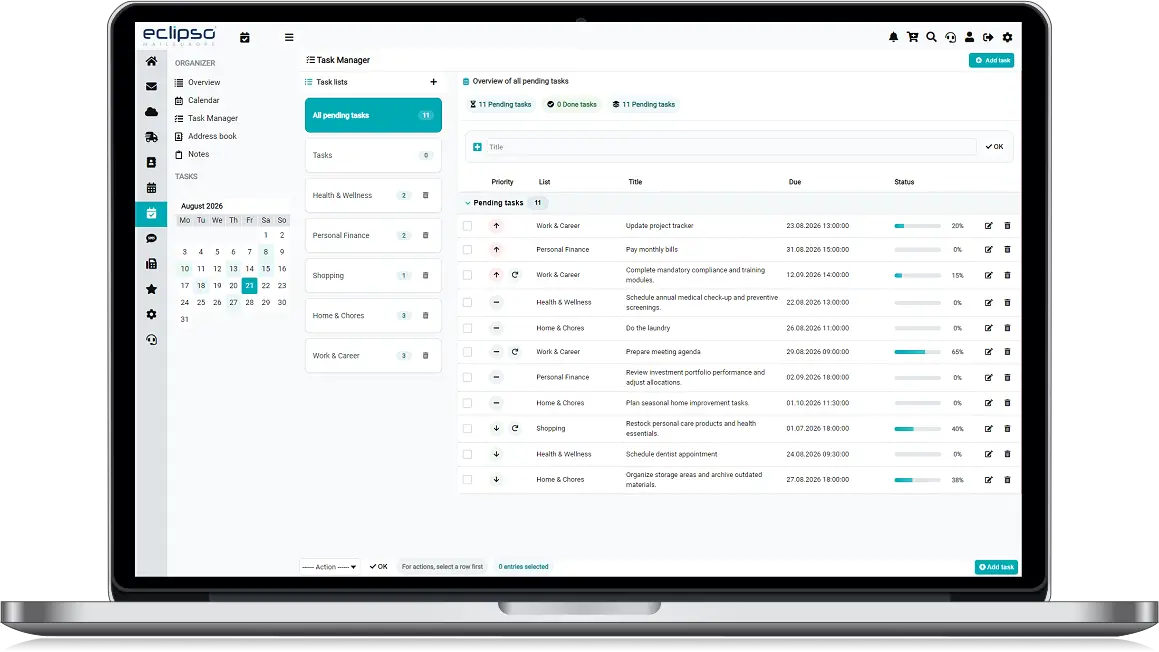
Separate task lists
Create lists for work, private errands, projects or routines and move tasks between them.
Due dates and progress
Add start and due dates, record progress and keep important deadlines visible.
Priorities and statuses
Prioritize tasks and update their status from not started to in progress, done or postponed.
Quick actions
Add tasks quickly, mark them complete, edit them or apply actions to several tasks at once.
Recurring tasks
Plan daily, weekly, monthly or yearly tasks with a flexible end condition.
CalDAV synchronization
Synchronize VTODO task lists with compatible applications such as Mozilla Thunderbird.
Why use eclipso for your tasks?
A clear online Task Manager for anyone who wants to organize everyday work and private commitments without unnecessary complexity.
- Works in your browser - no separate task software required
- Flexible organization - lists, priorities, statuses and comments
- Open standard - CalDAV-compatible VTODO synchronization
- One account - Task Manager alongside email, calendar and contacts
Task management features at a glance
Capture tasks quickly, organize them clearly and keep progress under control with Task Manager.
Create and edit tasks
Add a title, comment, start date, due date, status and progress. Edit details whenever plans change.
Mark tasks complete
Set tasks to done or open again and use quick status changes to keep your list current.
Prioritize what matters
Use low, normal and high priority to focus on the next important task.
Move tasks between lists
Reorganize individual or selected tasks when a project or category changes.
Repeat regular tasks
Configure daily, weekly, monthly or yearly repetitions with open, counted or date-based endings.
Use CalDAV VTODO
Connect compatible task applications and synchronize lists, due dates, priorities and status.
Suitable for everyday life and work
One flexible Task Manager for the tasks that keep your day moving.
Private tasks
Shopping, appointments, household routines and personal projects in one clear task list.
Work and deadlines
Track deliverables, follow-up tasks, administrative work and important due dates.
Recurring routines
Keep regular checks, reports, maintenance and other repeated responsibilities on schedule.
Frequently asked questions about Task Manager
Sync your tasks with CalDAV
Connect compatible task apps with your eclipso task lists using the industry-standard CalDAV protocol.*
www.eclipso.eu or https://www.eclipso.eu/interface/caldav.phpUse your eclipso email address and password for authentication.
Ready to get your tasks organized?
Create your eclipso account and start managing tasks online with Task Manager.
Start for free