Free in all tariffs RFC 4880

OpenPGP Encryption.
Native. Free. Simple.

eclipso Mail Europe integrates OpenPGP end-to-end encryption natively into your inbox - without extensions, without third-party software, without extra costs. Generate your key pair in under 2 minutes with our setup wizard.
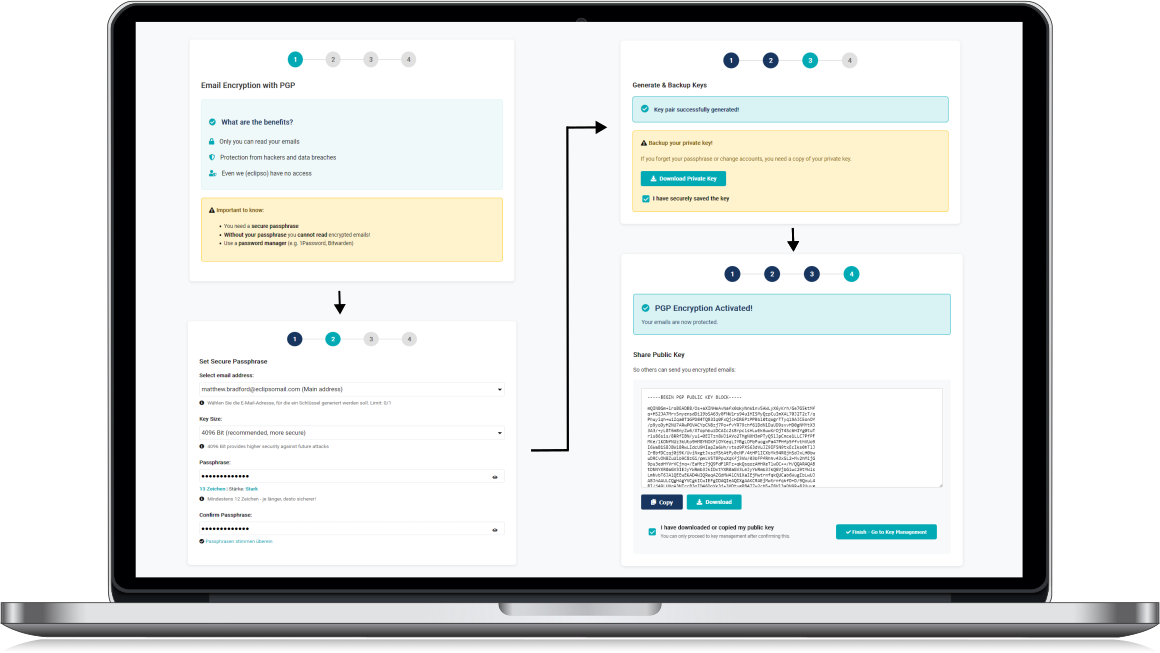
eclipso Mail Europe OpenPGP setup wizard - generate PGP key pair in 4 steps

Why OpenPGP end-to-end encryption

Only you can read it

Your emails are encrypted before they leave your device. Only the intended recipient - with their private key - can decrypt and read them. Not even eclipso can access the content.

Digital signatures

Sign your emails digitally - your recipients can verify that the message truly came from you and has not been tampered with in transit.

Works everywhere

The OpenPGP standard (RFC 4880) is supported by all major email clients: Thunderbird, Outlook, K-9 Mail and many more. Your key, your rules.

Ready in under 2 minutes

Get your own PGP key pair in just 4 steps.
No command line. No software. No prior knowledge.

Our guided setup wizard takes you step by step through generating your own PGP key pair - directly in your browser, without any technical knowledge.
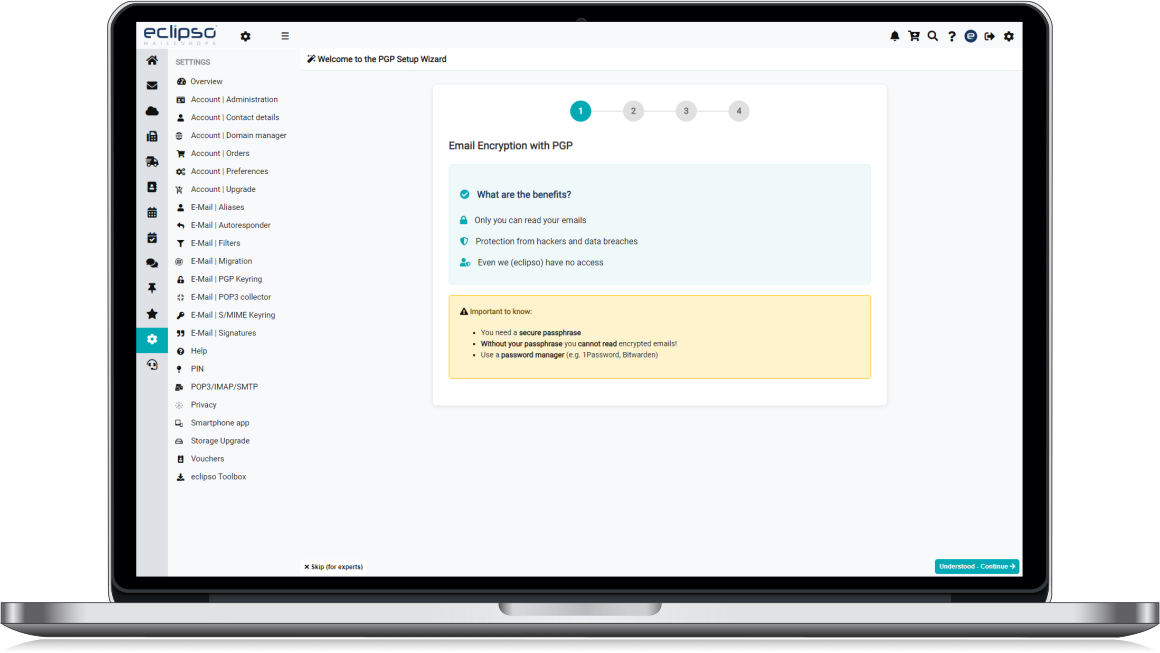
Choose the email address for your key pair. You can use your main address or any sender alias from your account. Each address gets its own dedicated key.

Your passphrase protects your private key. Our live strength indicator shows you how secure your passphrase is (minimum 12 characters). Important: No one can recover a forgotten passphrase - not even us.

eclipso generates a 4096-bit RSA key pair for you. Your private key is securely stored in your account. Download a backup copy of your private key and store it in a safe place - just in case.

Copy or download your public key and share it with your contacts - by email, on your website or via a key server. Anyone who has your public key can send you encrypted emails.
eclipso Mail Europe OpenPGP wizard - 4 steps to your key pair

Already using PGP with Thunderbird?

Import your existing key after sign-up
All devices

Your key. Available everywhere.

Unlike locally installed PGP software, your key pair is securely stored in your eclipso account - available on every device, without complex synchronization.

  • eclipso Webmail - encrypted emails in the browser, no extension needed
  • Mobile apps - read and write PGP-encrypted emails on your smartphone
  • Desktop clients - export your key and use it in Thunderbird or Outlook
  • Your private key never leaves your account unencrypted
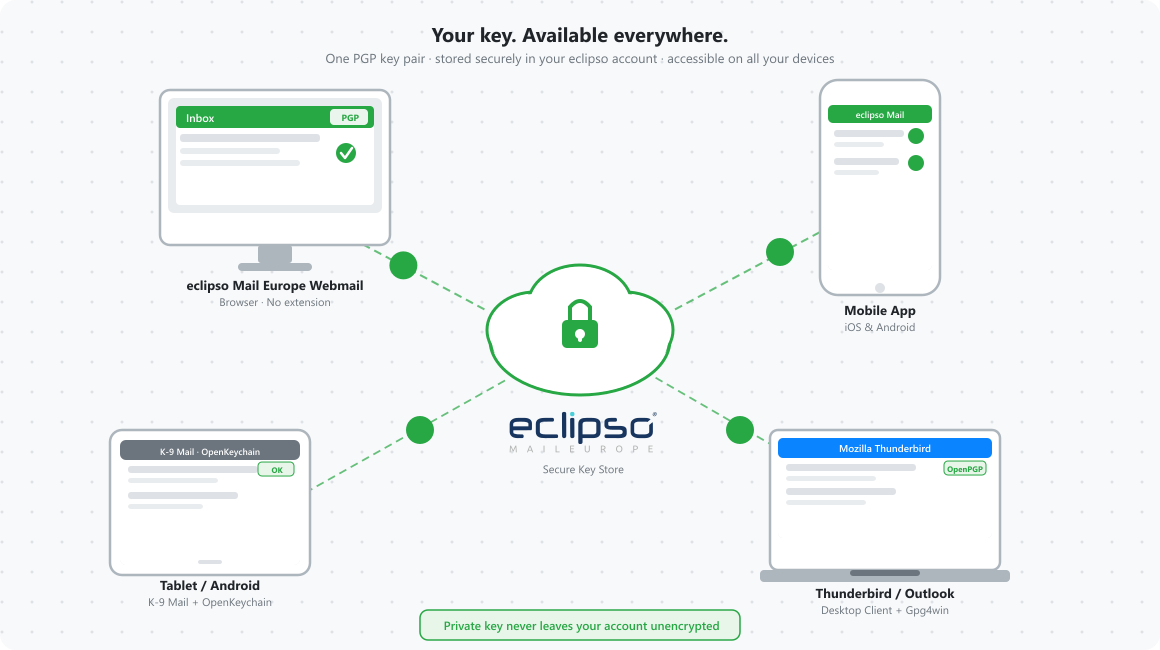
eclipso PGP encryption on desktop, tablet and smartphone - one key available everywhere

Compatible with your email client

eclipso Mail Europe uses the standard OpenPGP format (RFC 4880) - recognized by all major email clients.

Mozilla Thunderbird

Built-in OpenPGP

Outlook + Gpg4win

Windows standard

K-9 Mail

Android / OpenKeychain

Apple Mail

macOS + GPGMail

FairEmail

Android / OpenKeychain

Any RFC 4880 client

Open standard

How PGP encryption works

Simply explained - no prior knowledge required.

A PGP key pair consists of two mathematically linked keys: a public key (for everyone) and a private key (only for you). Together they form the basis for secure, encrypted communication.

Think of your public key as a mailbox slot - anyone can put a letter in, but only you can open the mailbox with your private key. Share your public key freely; keep your private key strictly confidential.

Your passphrase is the password that protects your private key. Even if someone gains access to your stored private key file, they cannot use it without your passphrase. Choose a long, unique passphrase - and never forget it. There is no recovery option.

End-to-end means: your email is encrypted on your device before sending and only decrypted on the recipient's device. No server in between - including eclipso's servers - can read the content. This is fundamentally different from transport encryption (TLS), which only protects the transmission path.

Frequently Asked Questions

Yes, absolutely. OpenPGP is included in all eclipso Mail Europe tariffs - including the free account. No upgrade, no additional costs, no add-on required.

Yes. Go to your account settings → Security → PGP Keys and select "Import key". eclipso supports the standard OpenPGP format (RFC 4880) - fully compatible with Thunderbird, Gpg4win, OpenKeychain and all other standard clients.

Your private key is permanently inaccessible without your passphrase - and that is precisely what makes end-to-end encryption secure. Nobody - not even eclipso - can recover a forgotten passphrase. We strongly recommend downloading a backup during the setup wizard (Step 3).

Yes! Incoming PGP-encrypted emails are decrypted directly in the eclipso webmail interface. No browser extension, no local software installation needed. Your private key is stored securely in your account and protected by your passphrase.

All clients that support the standard OpenPGP format (RFC 4880): Mozilla Thunderbird (built-in), Microsoft Outlook + Gpg4win, K-9 Mail, Thunderbird for Android, Apple Mail + GPGMail, FairEmail and many more. Export your public or private key from your account settings to use it in any of these clients.

By default, one key pair per email address is supported. If you use sender aliases, you can generate a separate key pair for each alias - so each sender identity has its own dedicated key.

Start encrypted - for free.

Create your free eclipso Mail Europe account now and set up OpenPGP encryption with our wizard in under 2 minutes. No credit card required.

Download Our Free App Now

Our app for iOS and Android includes the most important features and gives you mobile access to your emails, contacts, photos and files.

Download now for free from the Apple App Store or Google Play Store.

App Store Google Play
Download our free app now